
MPI Workflow with EESSI #
Use this workflow to run the same MPI application on any supported HPC system or switch between multiple systems without rewriting anything. Upload your source code once, select where it should run in the Portal, and LEXIS Platform transfers the files and submits the job for you.
In this tutorial, you will build and run a small application that shares the work of estimating \(\pi\) between many processes. Every process also prints the compute node on which it runs, so the job log clearly shows when the application uses multiple nodes. You can then replace the example with your own CMake project.
Note
Before starting, log in to the LEXIS Platform and select a project with assigned computation resources. For help with these prerequisites, see How-to Guide.
Prepare the Source Dataset#
Start by creating a folder named my-mpi-app for the application
source files. It should have this structure:
my-mpi-app/
|-- CMakeLists.txt
`-- src/
    `-- mpi_pi.c
Create CMakeLists.txt in the top-level directory:
cmake_minimum_required(VERSION 3.18)
project(distributed_mpi_pi LANGUAGES C)

# Find the MPI C compiler and libraries.
find_package(MPI REQUIRED COMPONENTS C)

# Build the application and link it with MPI.
add_executable(mpi_pi src/mpi_pi.c)
target_link_libraries(mpi_pi PRIVATE MPI::MPI_C)
target_compile_features(mpi_pi PRIVATE c_std_99)
Create src/mpi_pi.c:
#include <mpi.h>
#include <stdio.h>
#include <stdlib.h>

int main(int argc, char **argv) {
    int rank, size, name_length;
    char node[MPI_MAX_PROCESSOR_NAME];
    double sum = 0.0, total = 0.0;

    /* Start MPI and identify this process. */
    MPI_Init(&argc, &argv);
    MPI_Comm_rank(MPI_COMM_WORLD, &rank);
    MPI_Comm_size(MPI_COMM_WORLD, &size);
    MPI_Get_processor_name(node, &name_length);

    long steps = atol(argv[1]);
    printf("Hi from rank %d of %d on %s\n", rank, size, node);

    /* Split the calculation between all processes. */
    double elapsed = MPI_Wtime();
    for (long i = rank; i < steps; i += size) {
        double x = (i + 0.5) / steps;
        sum += 4.0 / (1.0 + x * x);
    }

    /* Combine the partial results on rank zero. */
    MPI_Reduce(&sum, &total, 1, MPI_DOUBLE, MPI_SUM, 0, MPI_COMM_WORLD);
    elapsed = MPI_Wtime() - elapsed;

    if (rank == 0) {
        printf("Integration steps: %ld\n", steps);
        printf("MPI processes: %d\n", size);
        printf("Estimated pi: %.12f\n", total / steps);
        printf("Elapsed time: %.6f seconds\n", elapsed);
    }

    MPI_Finalize();
    return 0;
}
Zip the source files into my-mpi-app.zip:
cd my-mpi-app
zip -r ../my-mpi-app.zip CMakeLists.txt src
Upload my-mpi-app.zip in Data Management/Datasets and enable
the option to unpack it at the destination. Name the dataset
MPI Pi Source. For detailed upload instructions, see
Data Management .
Prepare the Jobscript#
The jobscript only needs to prepare the shared software environment, build the staged source code and start the application:
# Load the compiler, MPI and CMake
source /cvmfs/software.eessi.io/versions/2023.06/init/bash
module load buildenv/default-foss-2023b
module load CMake/3.27.6-GCCcore-13.2.0

# Build the source code
cmake -S ./input -B ./build -DCMAKE_BUILD_TYPE=Release
cmake --build ./build --parallel

# Use PI_STEPS from the workflow, or one million steps by default.
STEPS="${PI_STEPS:-1000000}"

# Save the application output in the output dataset
mkdir -p ./output
mpirun ./build/mpi_pi "$STEPS" | tee ./output/mpi_output.txt
Note
Each workflow execution uses a temporary working directory. Files
that should be preserved must be written to the configured output
directory and staged as an output dataset.
The setup commands enable EESSI, a shared collection of scientific software available on HPC systems. They provide the same compiler, Open MPI and CMake module names wherever this EESSI version is available. This is what keeps the build commands independent of system-specific module names.
mpirun starts the application on the processes and nodes assigned
to the job; you do not need to provide a host list or process count.
The PI_STEPS environment variable controls how many integration
steps each execution divides between those processes. If it is not set,
the application uses 1000000 steps.
Important
Software versions can differ between HPC systems. If the job reports that a module is unavailable, check the selected system’s software documentation and update the module versions in the jobscript.
Upload the script as a jobscript named Distributed MPI Pi. Follow
Job Scripts section for the upload procedure, including project
selection, access level, metadata and version management.
Create the Workflow#
Open Workflows from the main menu and click HPC Jobscript.
Find Distributed MPI Pi and create a workflow from the version you
uploaded. See Create LEXIS Platform workflow from job script for the general
procedure. Use these MPI-specific settings:
Enter
Distributed MPI Pi Workflowas the name.Select an HPC system, a CPU partition and the computation resource assigned to your project. These are the workflow defaults; you can change them when creating each workflow execution.
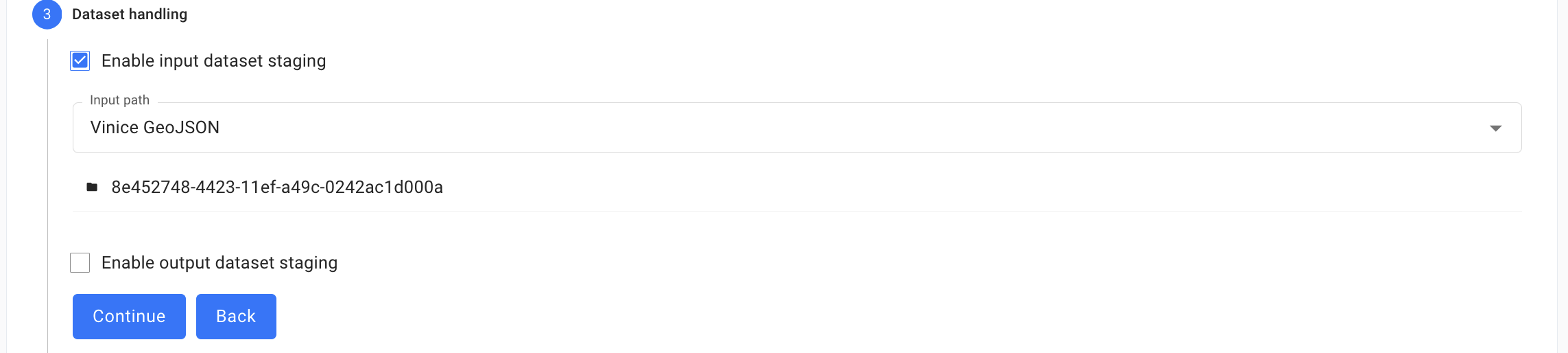
Enable input dataset staging and select
MPI Pi Source. Set the target path toinput.Enable output dataset staging and enter
Distributed MPI Pi Outputas the output dataset title. Set the source path tooutput, which is the directory created by the jobscript.In the advanced settings, set Max cores to a value greater than the number of cores in one compute node. This makes the scheduler allocate multiple nodes. Choose a walltime limit suitable for a short test job, such as
300seconds.Under Application Environment Variables, add
PI_STEPSwith the default value1000000and click the plus button.Review the summary and create the workflow.
Run the Workflow#
Return to Workflows and find Distributed MPI Pi Workflow. Click
the magnifying glass icon to open its details, then click
Create Workflow Execution. See Execution of LEXIS Platform Workflows.
Give the execution a name such as Run 1 and keep
the configured input and output datasets. Under Requirements, change
the value of PI_STEPS to the number of integration steps for this
run. Continue through the remaining steps and click Create. LEXIS Platform
transfers the source dataset and submits the execution to the selected
HPC system.
Try creating several executions with values such as 1000,
1000000 and 1000000000. The result and elapsed time show how
the amount of work affects accuracy and runtime.
Check the Results#
Open the workflow execution details after the execution finishes.
In the progress view, select the job task and open its HPC job logs
as described in Execution of LEXIS Platform Workflows. The log should
contain one line per rank, followed by the result. Lines from different
ranks can appear in any order. For example:
Hi from rank 0 of 80 on compute-node-a
Hi from rank 1 of 80 on compute-node-a
...
Hi from rank 64 of 80 on compute-node-b
Hi from rank 65 of 80 on compute-node-b
Integration steps: 1000000
MPI processes: 80
Estimated pi: 3.141592653590
Elapsed time: 0.001234 seconds
Processor names, rank placement and output order vary between executions. Distinct processor names confirm that the application ran across multiple nodes. The summary shows the selected problem size, the resources used, the combined result and the measured runtime.
The staged Distributed MPI Pi Output dataset contains
mpi_output.txt. Open it from the execution’s Output datasets
section or from Data Management/Datasets.