
Airflow orchestrator#
Templating#
LEXIS Platform supports three basic templates for the workflow creation: - Container to execute a job containing apptainer (singularity) container, - HPC Command Application to execute predefined HEAppE Command Template (job script), - Custom Job Script to execute custom (user defined) job script.
Anyway, as mentioned above, the user can specify the computational workflow using LWD YAML specification. It allows to create a custom (arbitrary) workflow in a user-friendly way while ensuring the security as described few lines above. Thus, the user can define as arbitrary workflow as possible. The example Complete Example demonstrates simple HPC workflow with data transfer.
Examples#
TOSCA workflow#
tosca_definitions_version: tosca_simple_yaml_1_2


metadata:
template_name: lexis_job_with_data_dag
template_version: v1_0
template_uo: ADAS - IT4Innovations
template_author: Jan Swiatkowski
template_contact_email: jan.swiatkowski@vsb.cz
start_date: "2023-02-21"

description: LEXIS example workflow with data for Apache Airflow

imports:
- https://nextcloud.it4i.cz/s/PL2jsXSMRkMxj7Q/download/lexis-airflow-types.yaml

topology_template:
# TEMPLATE INPUTS
inputs:
    access_token:
    type: string
    required: True
    default: ""
    computation_project:
    type: string
    required: True
    default: ""
    job1_cluster_id:
    type: number
    required: True
    default: 2
    job1_command_template_id:
    type: number
    required: True
    default: 3
    job1_parameters:
    type: map
    required: True
    default: {"inputParam":"test"}
    job1_cluster_node_type_id:
    type: number
    required: True
    default: 8
    job1_max_cores:
    type: number
    required: True
    default: 24
    job1_filetransfer_method_id:
    type: number
    required: True
    default: 2
    job1_heappe_uri:
    type: string
    required: True
    default: "https://heappe.it4i.cz/lexis"
    job1_input_dataset_path:
    type: string
    required: True
    default: "project/proj812b07ed780274387d12c665fa3a4f7f/5e51f28c-88fa-11ec-a591-00155d4ab2e4/test10M.dat"
    job1_output_dataset_path:
    type: string
    required: True
    default: "project/proj812b07ed780274387d12c665fa3a4f7f"
    job1_output_ddi_metadata:
    type: map #lexis.datatypes.ddi.Metadata
    required: True
    default:
        contributor: ["Testing"]
        creator: ["Testing"]
        owner: ["Testing"]
        publicationYear: "2022"
        publisher: ["Airflow"]
        resourceType: Test data
        title: AIRFLOW test output TOSCA


# NODES
node_templates:
    # token management
    ref_token:
    type: lexis.nodes.operators.aai.LexisAAIOperator
    properties:
        access_token: { get_input: access_token }
    ref_token_keeper:
    type: lexis.nodes.operators.aai.LexisAAITokenKeeperSensor
    requirements:
        - aai_operator: ref_token
    ref_token_keeper_stop:
    type: lexis.nodes.operators.aai.LexisAAIStopKeeperOperator
    requirements:
        - previous_task: job1_heappe_job_delete

    # HEAppE Job context
    job1_heappe_session:
    type: lexis.nodes.operators.heappe.HEAppESessionOperator
    properties:
        heappe_uri: { get_input: job1_heappe_uri }
    requirements:
        - aai_operator: ref_token
        - previous_task: ref_token
    # keep session active
    job1_heappe_session_keeper_stop:
    type: lexis.nodes.operators.heappe.HEAppESessionStopKeeperOperator
    requirements:
        - previous_task: job1_heappe_job_delete

    job1_heappe_session_keeper:
    type: lexis.nodes.operators.heappe.HEAppESessionKeeperSensor
    properties:
        heappe_session_task_id: { get_attribute: [ job1_heappe_session, task_id ] }
        heappe_session_stop_task_id: { get_attribute: [ job1_heappe_session_keeper_stop, task_id ] }
    requirements:
        - heappe_session_task_id: job1_heappe_session
    # HEAppE Job
    job1_heappe_prepare_job:
    type: lexis.nodes.operators.heappe.HEAppEPrepareJobOperator
    properties:
        Name: Job Name n.1
        Project: { get_input: computation_project }
        ClusterId: { get_input: job1_cluster_id }
        CommandTemplateId: { get_input: job1_command_template_id }
        FileTransferMethodId: { get_input: job1_filetransfer_method_id }
        EnvironmentVariables: {}
        MaxCores: { get_input: job1_max_cores }
        Priority: 4
        ClusterNodeTypeId: { get_input: job1_cluster_node_type_id }
        TemplateParameterValues: { get_input: job1_parameters }
        heappe_session_task_id: { get_attribute: [ job1_heappe_session, task_id ] }
    requirements:
        - heappe_session_task_id: job1_heappe_session

    # enable file transfer from DDI
    job1_heappe_enable_filetransfer:
    type: lexis.nodes.operators.heappe.HEAppEEnableFileTransferOperator
    properties:
        heappe_session_task_id: { get_attribute: [ job1_heappe_session, task_id ] }
        heappe_prepare_job_task_id: { get_attribute: [ job1_heappe_prepare_job, task_id ] }
    requirements:
        - heappe_session_task_id: job1_heappe_session
        - heappe_prepare_job_task_id: job1_heappe_prepare_job
    # transfer data
    job1_ddi_data_input_transfer:
    type: lexis.nodes.operators.ddi.LexisStagingOperator
    properties:
        source_system: it4i_iRODS
        source_path: { get_input: job1_input_dataset_path }
        target_system: karolina_home
        target_path: "/"
        heappe_prepare_job_task_id: { get_attribute: [ job1_heappe_prepare_job, task_id ] }
        heappe_enable_file_transfer_task_id: {get_attribute: [ job1_heappe_enable_filetransfer, task_id ] }
    requirements:
        - heappe_prepare_job_task_id: job1_heappe_prepare_job
        - heappe_enable_file_transfer_task_id: job1_heappe_enable_filetransfer
        - previous_task: job1_heappe_enable_filetransfer

    # wait for the DDI operation
    job1_ddi_data_input_wait:
    type: lexis.nodes.operators.ddi.LexisWaitStagingRequestSensor
    properties:
        staging_operator_task_id: { get_attribute: [ job1_ddi_data_input_transfer, task_id ] }
    requirements:
        - staging_operator_task_id: job1_ddi_data_input_transfer

    # submit HEAppe job
    job1_heappe_submit_job:
    type: lexis.nodes.operators.heappe.HEAppESubmitJobOperator
    properties:
        heappe_session_task_id: { get_attribute: [ job1_heappe_session, task_id ] }
        heappe_prepare_job_task_id: { get_attribute: [ job1_heappe_prepare_job, task_id ] }
    requirements:
        - heappe_session_task_id: job1_heappe_session
        - heappe_prepare_job_task_id: job1_heappe_prepare_job
        - previous_task: job1_ddi_data_input_wait

    job1_heappe_job_wait:
    type: lexis.nodes.operators.heappe.HEAppEWaitSubmittedJobSensor
    properties:
        heappe_session_task_id: { get_attribute: [ job1_heappe_session, task_id ] }
        heappe_submitted_job_task_id: { get_attribute: [ job1_heappe_submit_job, task_id ] }
    requirements:
        - heappe_session_task_id: job1_heappe_session
        - heappe_submitted_job_task_id: job1_heappe_submit_job

    # transfer job output
    job1_job_output_to_ddi:
    type: lexis.nodes.operators.ddi.LexisStagingOperator
    properties:
        target_system: it4i_iRODS
        target_path: { get_input: job1_output_dataset_path }
        source_system: karolina_home
        source_path: "/"
        heappe_prepare_job_task_id: { get_attribute: [ job1_heappe_prepare_job, task_id ] }
        heappe_enable_file_transfer_task_id: {get_attribute: [ job1_heappe_enable_filetransfer, task_id ] }
    requirements:
        - heappe_prepare_job_task_id: job1_heappe_prepare_job
        - heappe_enable_file_transfer_task_id: job1_heappe_enable_filetransfer
        - previous_task: job1_heappe_job_wait

    # wait for the DDI operation
    job1_ddi_data_output_wait:
    type: lexis.nodes.operators.ddi.LexisWaitStagingRequestSensor
    properties:
        staging_operator_task_id: { get_attribute: [ job1_job_output_to_ddi, task_id ] }
    requirements:
        - staging_operator_task_id: job1_job_output_to_ddi

    job1_heappe_end_filetransfer:
    type: lexis.nodes.operators.heappe.HEAppEEndFileTransferOperator
    properties:
        heappe_session_task_id: { get_attribute: [ job1_heappe_session, task_id ] }
        heappe_prepare_job_task_id: { get_attribute: [ job1_heappe_prepare_job, task_id ] }
        heappe_enable_file_transfer_task_id: {get_attribute: [ job1_heappe_enable_filetransfer, task_id ] }
    requirements:
        - heappe_session_task_id: job1_heappe_session
        - heappe_prepare_job_task_id: job1_heappe_prepare_job
        - heappe_enable_file_transfer_task_id: job1_heappe_enable_filetransfer
        - previous_task: job1_ddi_data_output_wait

    # end HEAppE job
    job1_heappe_job_delete:
    type: lexis.nodes.operators.heappe.HEAppEDeleteJobOperator
    properties:
        heappe_session_task_id: { get_attribute: [ job1_heappe_session, task_id ] }
        heappe_prepare_job_task_id: { get_attribute: [ job1_heappe_prepare_job, task_id ] }
    requirements:
        - heappe_session_task_id: job1_heappe_session
        - heappe_prepare_job_task_id: job1_heappe_prepare_job
        - previous_task: job1_heappe_end_filetransfer
SOM DAG and execution#
A short example of executing SOM algorithm (Self-Organizing Map) on the LEXIS portal is provided in this section. At first, the SOM DAG created in python is shown below.
ref_token = LexisAAIOperator(
    task_id="refresh_token_task",
    access_token="{{ params.access_token }}"
)

ref_token_keeper = LexisAAITokenKeeperSensor(
    task_id="ref_token_keeper",
)

ref_token_stop = LexisAAIStopKeeperOperator()

# Get Heappe session
job1_heappe_session = HEAppESessionOperator(task_id="job1_heappe_session", heappe_uri="{{ params.job1_heappe_uri }}")
job1_heappe_session_keeper = HEAppESessionKeeperSensor(
    task_id="job1_heappe_session_keeper",
    heappe_session_task_id="job1_heappe_session",
    heappe_session_stop_task_id="job1_heappe_session_keeper_stop"
)
job1_heappe_session_keeper_stop = HEAppESessionStopKeeperOperator(
    task_id="job1_heappe_session_keeper_stop",
)
job1_heappe_prepare_job = HEAppEPrepareJobOperator(
    task_id="job1_heappe_prepare_job",
    heappe_session_task_id="job1_heappe_session",
    Name="{{ params.name }}",
    Project="{{ params.computation_project }}",
    ClusterId="{{ params.job1_cluster_id }}",
    CommandTemplateId="{{ params.job1_command_template_id }}",
    ClusterNodeTypeId="{{ params.job1_cluster_node_type_id }}",
    FileTransferMethodId="{{ params.job1_filetransfer_method_id }}",
    TemplateParameterValues="{{ params.job1_parameters }}",
    MaxCores="{{ params.job1_max_cores }}"
)

job1_heappe_enable_filetransfer = HEAppEEnableFileTransferOperator(
    task_id="job1_heappe_enable_filetransfer",
    heappe_prepare_job_task_id="job1_heappe_prepare_job",
    heappe_session_task_id="job1_heappe_session",
)

job1_ddi_data_input_transfer = LexisStagingOperator(
    task_id="job1_ddi_data_input_transfer",
    source_system="it4i_iRODS",
    source_path="{{ params.job1_input_dataset_path }}",
    target_system="karolina_home",
    target_path="/",
    heappe_prepare_job_task_id="job1_heappe_prepare_job",
    heappe_enable_file_transfer_task_id="job1_heappe_enable_filetransfer"
)

job1_ddi_data_input_wait = LexisWaitStagingRequestSensor(
    task_id="job1_ddi_data_input_transfer_wait",
    staging_operator_task_id="job1_ddi_data_input_transfer"
)

job1_heappe_submit_job = HEAppESubmitJobOperator(
    task_id="job1_heappe_submit_job",
    heappe_prepare_job_task_id="job1_heappe_prepare_job",
    heappe_session_task_id="job1_heappe_session",
)

job1_heappe_job_wait = HEAppEWaitSubmittedJobSensor(
    task_id="job1_heappe_job_waiting",
    heappe_submitted_job_task_id="job1_heappe_submit_job",
    heappe_session_task_id="job1_heappe_session",
)

job1_job_output_to_ddi = LexisStagingOperator(
    task_id="job1_to_ddi",
    target_system="it4i_iRODS",
    target_path="{{ params.job1_output_dataset_path }}",
    source_system="karolina_home",
    source_path="/",
    metadata="{{ params.job1_output_ddi_metadata }}",
    heappe_prepare_job_task_id="job1_heappe_prepare_job",
    heappe_enable_file_transfer_task_id="job1_heappe_enable_filetransfer"
)

job1_ddi_data_output_wait = LexisWaitStagingRequestSensor(
    task_id="job1_ddi_data_output_transfer_wait",
    staging_operator_task_id="job1_to_ddi"
)

job1_heappe_end_filetransfer = HEAppEEndFileTransferOperator(
    task_id="job1_heappe_end_filetransfer",
    heappe_prepare_job_task_id="job1_heappe_prepare_job",
    heappe_enable_file_transfer_task_id="job1_heappe_enable_filetransfer",
    heappe_session_task_id="job1_heappe_session"
)

job1_heappe_job_delete = HEAppEDeleteJobOperator(
    task_id="job1_heappe_job_delete",
    heappe_prepare_job_task_id="job1_heappe_prepare_job",
    heappe_session_task_id="job1_heappe_session",
)

ref_token >> job1_heappe_session >> job1_heappe_prepare_job\
>> job1_heappe_enable_filetransfer \
>> job1_ddi_data_input_transfer >> job1_ddi_data_input_wait >> job1_heappe_submit_job >> job1_heappe_job_wait \
>> job1_job_output_to_ddi >> job1_ddi_data_output_wait >> job1_heappe_end_filetransfer\
>> job1_heappe_job_delete >> job1_heappe_session_keeper_stop >> ref_token_stop

ref_token >> job1_heappe_session >> job1_heappe_session_keeper >> ref_token_stop
ref_token >> ref_token_keeper
Further, in the figure below, the SOM DAG details from the LEXIS portal are shown. User can use the LEXIS portal to create a workflow execution. To do so, user has to click on CREATE WORKFLOW EXECUTION button below the DAG details.
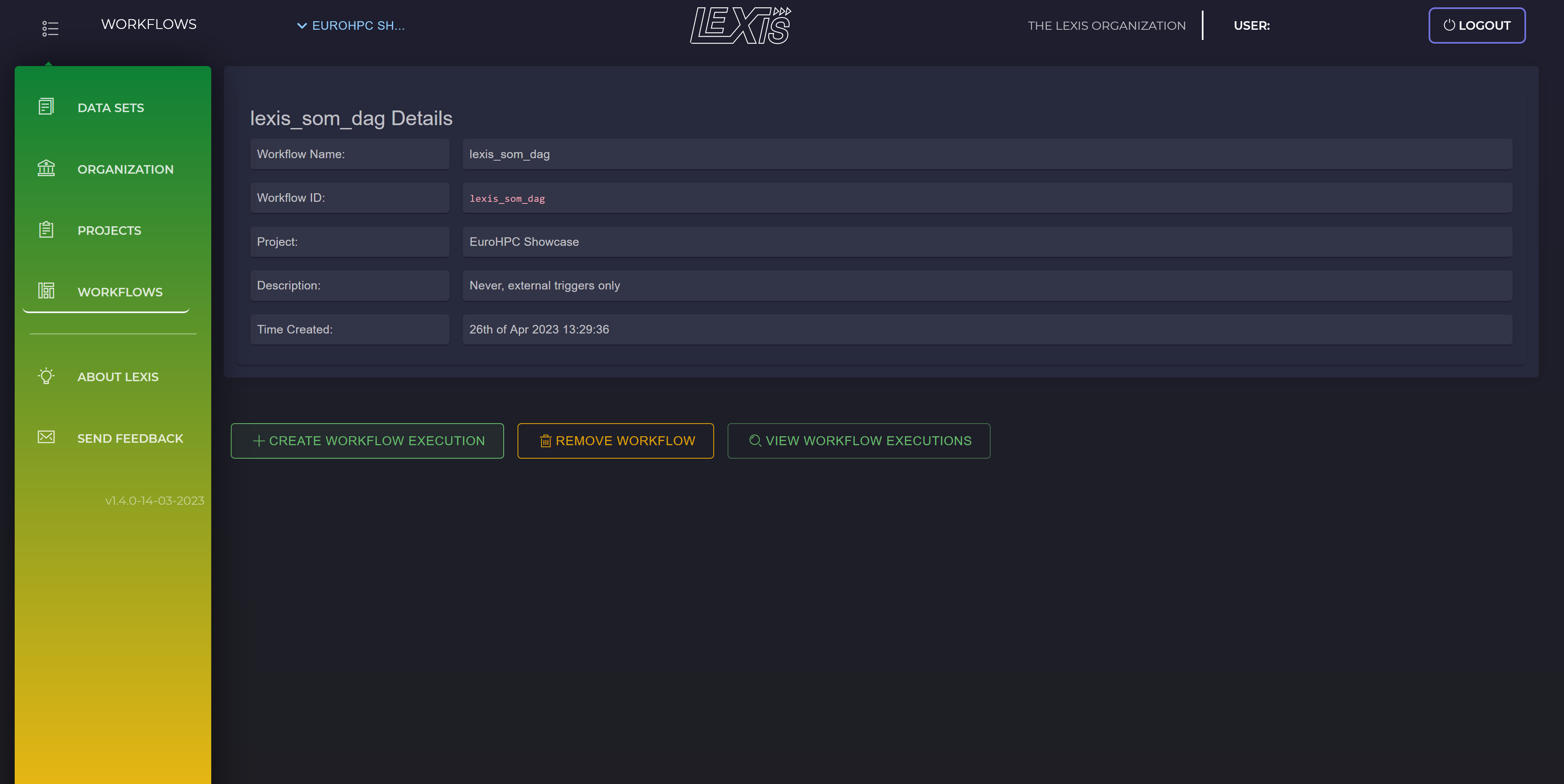
SOM workflow in LEXIS portal: DAG details.#
Then, as seen in the figure below, job parameters has to be filled. After everything is set, user has to click on CREATE in the upper left corner.
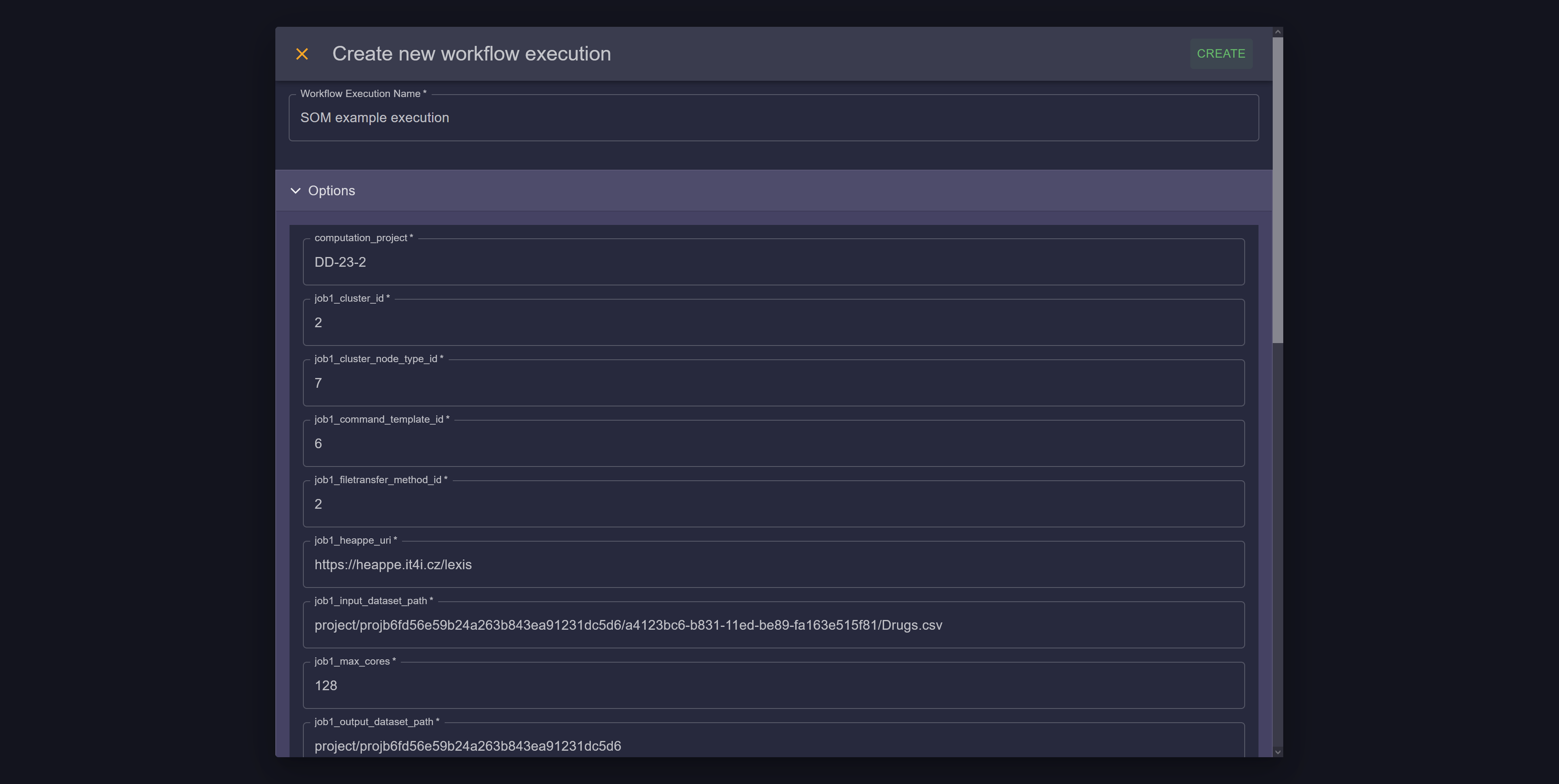
SOM workflow in LEXIS portal: set parameters.#
After the workflow execution is created, the workflow runtime can be observed as shown in the figure below. Each rectangle is colored by appropriate color during the runtime. All posible colors, which may occurs during the runtime, are shown in the bottom of workflow map.
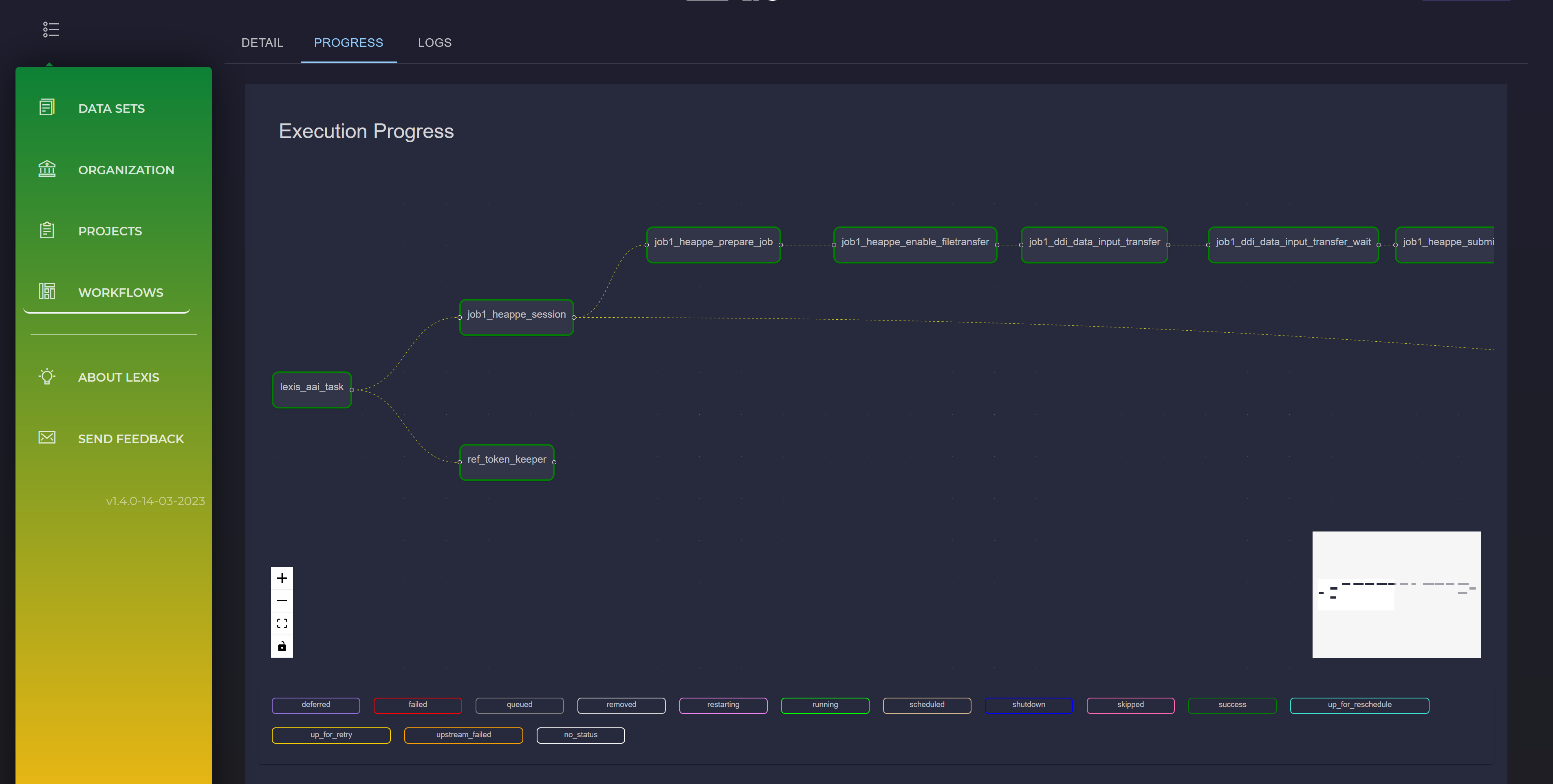
SOM workflow in LEXIS portal: workflow map.#
If the workflow execution was successful, user can check the resulting data on the LEXIS portal. In this case, the data can be visualized using the aweSOM Shiny App developed within IT4Innovations, as can be seen below.
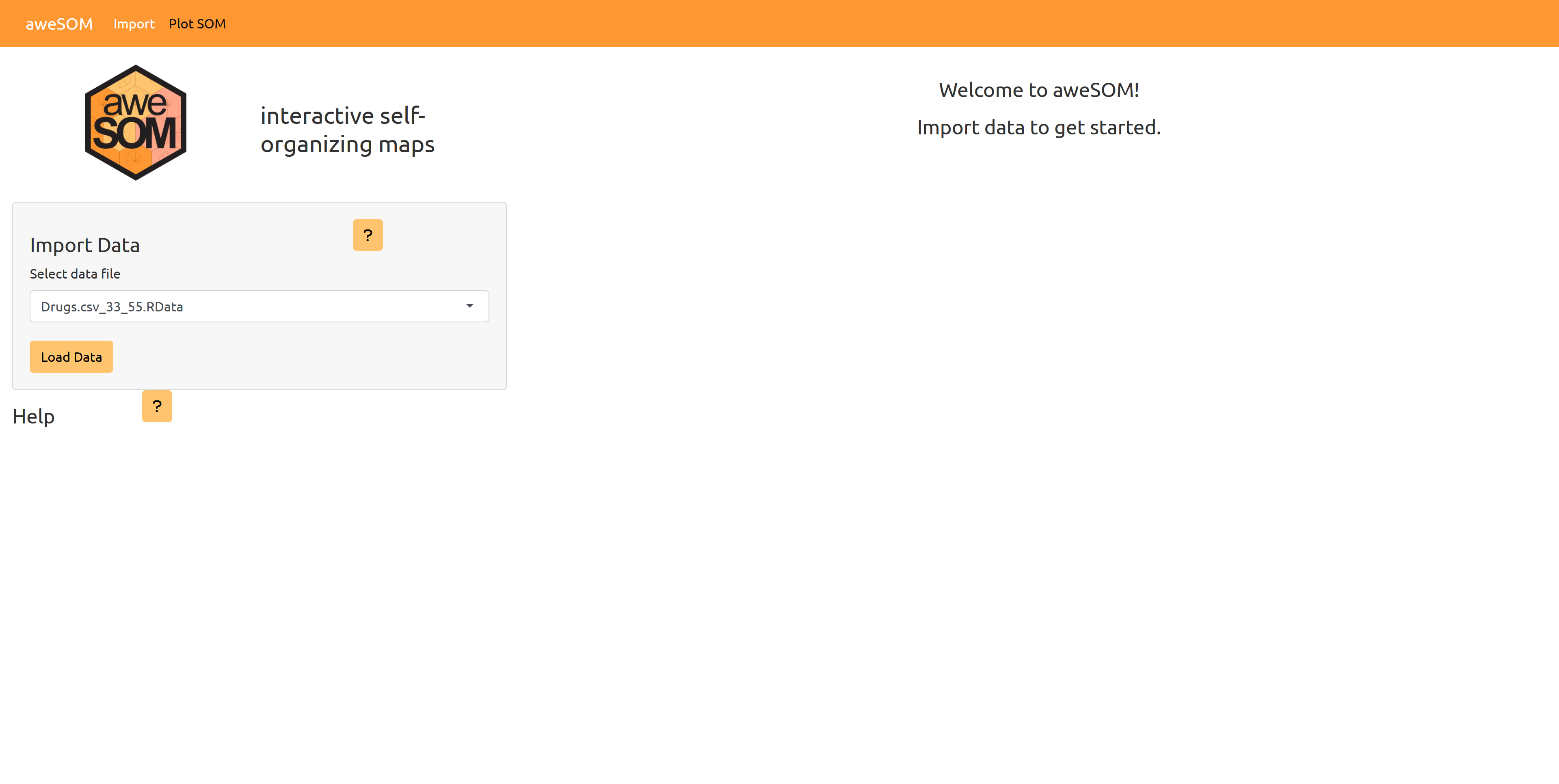
SOM Shiny App: Load data.#
The user can manipulate with interactive fields, buttons, and sliders, to adjust visualizations of the data.
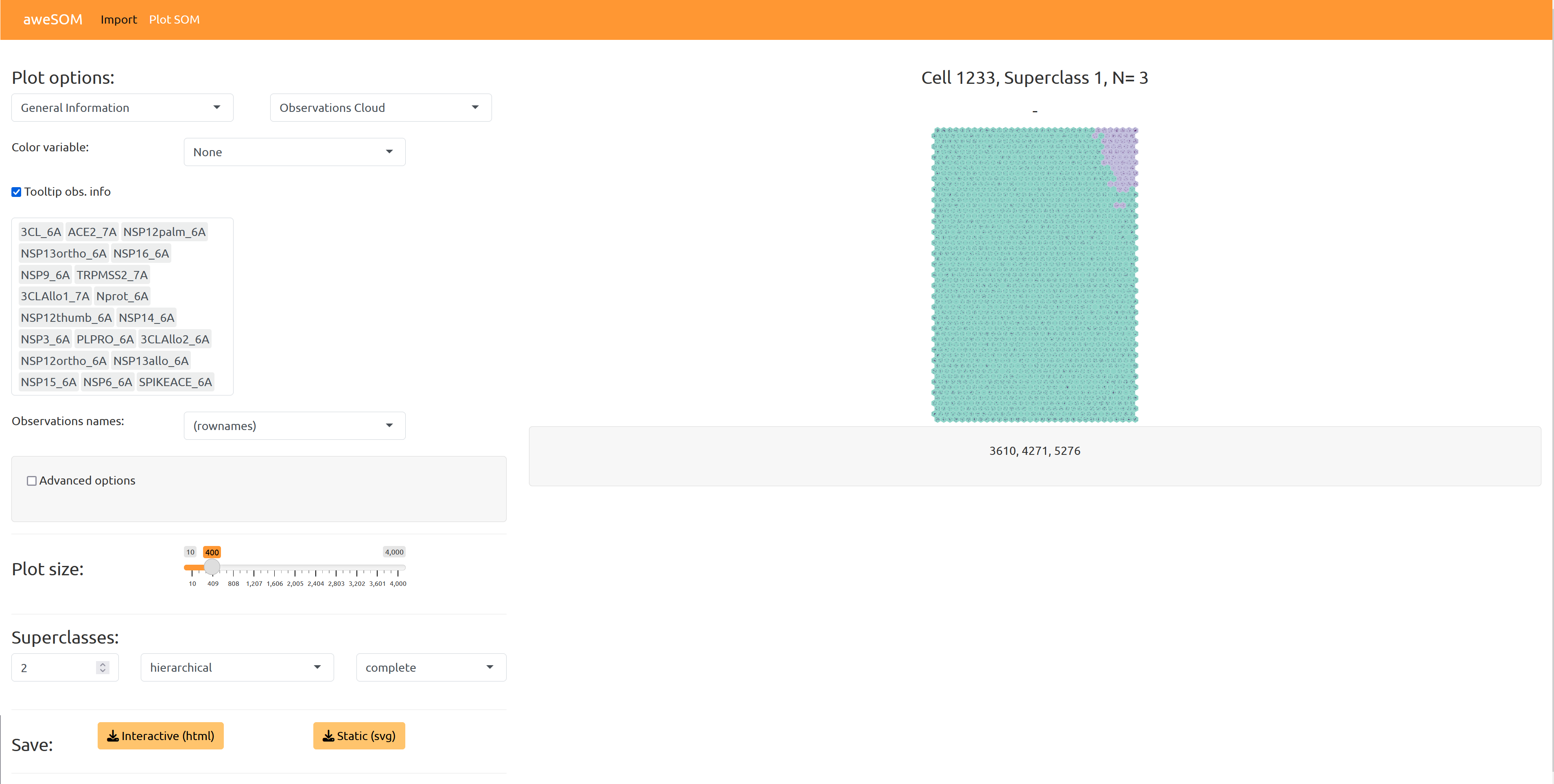
SOM Shiny App: data visualization.#